> ## Documentation Index
> Fetch the complete documentation index at: https://inference-docs.cerebras.ai/llms.txt
> Use this file to discover all available pages before exploring further.
# Projects
> Organize workloads, isolate environments, control costs, and manage access using Projects in the Cerebras Cloud console.
Projects are workspaces within your organization that group API keys, rate limits, and members. Use them to isolate environments, segment usage analytics, and control who can access what.
Every organization starts with a **Default Project** that contains all existing API keys, members, and quotas. If you don't create additional projects, nothing about your setup changes.
## Concepts & Hierarchy
**Organization** — Your top-level account. Billing, global rate-limit ceilings, and project management live here.
**Project** — A workspace within an organization. Every API key belongs to exactly one project, and all keys in a project share that project's rate limits.
## Roles & Permissions
In addition to organization roles, each project has its own set of roles. Roles are assigned from the [Members page](/console/account-billing#members).
**Limited** - applies only to projects the user is assigned to.
| Action | Org Admin | Project Admin | Project Member |
| ------------------------- | -------------------------------------- | -------------------------------------- | -------------------------------------- |
| Create / archive projects | | | |
| Set project rate limits | | | |
| View all projects in org | | Limited | Limited |
| Create API keys | | Limited | |
| Delete API keys | | Limited | |
| View API keys | | Limited | Limited |
| Use API keys | | Limited | Limited |
| View usage & logs | | Limited | Limited |
| Manage org members | | | |
| Manage project members | | Limited | |
**Key behaviors:**
* Members are invited at the organization level, then assigned to one or more projects.
* Org Admins are automatically added to all projects with write access.
* If a user is only assigned to one project and that project is archived, their organization access will be revoked. An Org Admin can restore it by adding them to another project.
## Navigate Projects in the Console
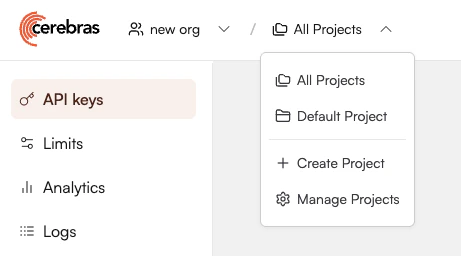
Use the **Organization / Project dropdown** in the top-left of the console to switch context:
* **Select a specific project** — all pages (Playground, API Keys, Limits, Analytics, Members, Audit Logs, Settings) filter to that project.
* **Select "All projects"** — org-level view. Available to Org Admins only.
 ## Create a Project
Only Org Admins can create projects.
1. In the console, open the **Projects** tab or select it from the Projects dropdown.
2. Click **Create project**.
3. Enter a project name.
4. Click **Save**. The project is created under your organization with no custom quotas, so it inherits org-level limits by default.
### Recommended Project Structures
Separate projects for each deployment stage:
```
dev, test, prod
```
Separate projects for each surface or tool:
```
frontend, internal-tools
```
Separate projects per team:
```
team-console, team-platform
```
Try to keep the number of projects in your organization to a minimum. Each project adds overhead for monitoring and rate limits management.
## Configure Rate Limits
Cerebras uses a two-level quota model. Every request must satisfy both levels to proceed.
| Level | Description |
| ----------------------- | ---------------------------------------------------------------------- |
| **Org-level quota** | Hard limit for the entire organization (e.g., 1M TPM on a given model) |
| **Project-level quota** | Per-project limit; cannot exceed the org-level quota |
By default, projects have no explicit quotas and inherit org-level limits. For example:
| Project | Configured limit |
| ------- | ------------------------------------------ |
| `prod` | 700,000 TPM |
| `test` | 600,000 TPM |
| `dev` | None (inherits org limit of 1,000,000 TPM) |
If `prod` and `test` together attempt 1,300,000 TPM, some requests are throttled at the organization level — even though each project is individually within its own configured limit.
### Set Project-Level Rate Limits
Only Org Admins can set project rate limits.
1. From the **All Projects** view, open the **Projects** tab.
2. Identify the project and click **Project Settings**.
3. For each model, set the desired rate limits.
4. Click **Save**.
**We recommend:**
* Starting with conservative limits for new projects
* Monitoring 429 responses and usage graphs per project
* Adjusting as you gain confidence in your workload patterns
## Manage Service Tiers
If service tiers are enabled for your organization, use the `service_tier` request parameter to prioritize traffic across projects — `flex` for lower-priority projects and `priority` for production. See the [Service Tier guide](/capabilities/service-tiers) for details.
## Archive Projects
Archived projects cannot be restored.
Only Org Admins can archive projects. You cannot archive your last remaining project. Archiving invalidates all API keys in the project, preserves usage logs for auditing, and revokes member access to the project.
## FAQs
They've been migrated into a Default Project under your organization, with the same quotas and members. Behavior is unchanged unless you configure additional projects or project-level limits.
No. Using only the Default Project is fully supported. Create additional projects only if you need isolated rate limits, access control, or separate analytics by use case.
Projects can be archived but not permanently deleted. Archiving disables all API keys in the project and preserves logs and usage history.
No. Each API key is scoped to exactly one project. To move a workload, create a new key in the target project and update your application to use it.
Projects don't create separate billing accounts. All usage accrued within a project is billed through your top-level organization. Projects provide logical segmentation for quotas, keys, and usage, but billing is always aggregated and invoiced at the organization level.
You may be hitting the project-level limit for that project, or the org-level ceiling across all projects. Check the **Limits** page for both the project and the org, then review the project's analytics.
## Create a Project
Only Org Admins can create projects.
1. In the console, open the **Projects** tab or select it from the Projects dropdown.
2. Click **Create project**.
3. Enter a project name.
4. Click **Save**. The project is created under your organization with no custom quotas, so it inherits org-level limits by default.
### Recommended Project Structures
Separate projects for each deployment stage:
```
dev, test, prod
```
Separate projects for each surface or tool:
```
frontend, internal-tools
```
Separate projects per team:
```
team-console, team-platform
```
Try to keep the number of projects in your organization to a minimum. Each project adds overhead for monitoring and rate limits management.
## Configure Rate Limits
Cerebras uses a two-level quota model. Every request must satisfy both levels to proceed.
| Level | Description |
| ----------------------- | ---------------------------------------------------------------------- |
| **Org-level quota** | Hard limit for the entire organization (e.g., 1M TPM on a given model) |
| **Project-level quota** | Per-project limit; cannot exceed the org-level quota |
By default, projects have no explicit quotas and inherit org-level limits. For example:
| Project | Configured limit |
| ------- | ------------------------------------------ |
| `prod` | 700,000 TPM |
| `test` | 600,000 TPM |
| `dev` | None (inherits org limit of 1,000,000 TPM) |
If `prod` and `test` together attempt 1,300,000 TPM, some requests are throttled at the organization level — even though each project is individually within its own configured limit.
### Set Project-Level Rate Limits
Only Org Admins can set project rate limits.
1. From the **All Projects** view, open the **Projects** tab.
2. Identify the project and click **Project Settings**.
3. For each model, set the desired rate limits.
4. Click **Save**.
**We recommend:**
* Starting with conservative limits for new projects
* Monitoring 429 responses and usage graphs per project
* Adjusting as you gain confidence in your workload patterns
## Manage Service Tiers
If service tiers are enabled for your organization, use the `service_tier` request parameter to prioritize traffic across projects — `flex` for lower-priority projects and `priority` for production. See the [Service Tier guide](/capabilities/service-tiers) for details.
## Archive Projects
Archived projects cannot be restored.
Only Org Admins can archive projects. You cannot archive your last remaining project. Archiving invalidates all API keys in the project, preserves usage logs for auditing, and revokes member access to the project.
## FAQs
They've been migrated into a Default Project under your organization, with the same quotas and members. Behavior is unchanged unless you configure additional projects or project-level limits.
No. Using only the Default Project is fully supported. Create additional projects only if you need isolated rate limits, access control, or separate analytics by use case.
Projects can be archived but not permanently deleted. Archiving disables all API keys in the project and preserves logs and usage history.
No. Each API key is scoped to exactly one project. To move a workload, create a new key in the target project and update your application to use it.
Projects don't create separate billing accounts. All usage accrued within a project is billed through your top-level organization. Projects provide logical segmentation for quotas, keys, and usage, but billing is always aggregated and invoiced at the organization level.
You may be hitting the project-level limit for that project, or the org-level ceiling across all projects. Check the **Limits** page for both the project and the org, then review the project's analytics.