> ## Documentation Index
> Fetch the complete documentation index at: https://inference-docs.cerebras.ai/llms.txt
> Use this file to discover all available pages before exploring further.

# Hyper-Personalized Web Pages

> Build hyper-personalized web pages using Cerebras AI with Pydantic structured outputs and Jinja2 templating—pages that adapt to each visitor's preferred colors, tone, and products in real-time.

export const CookbookLayout = () => {
  return <div className="full-width-layout" />;
};

export const AuthorBlock = ({name, title, date, githubUrl}) => {
  return <div style={{
    display: 'flex',
    alignItems: 'center',
    justifyContent: 'space-between',
    marginBottom: '1rem',
    marginTop: '1rem',
    gap: '1rem'
  }}>
      <div>
        <strong>{name}</strong>
        {title && <><br /><span style={{
    fontSize: '0.9em',
    color: '#666'
  }}>{title}</span></>}
        {date && <><br /><span style={{
    fontSize: '0.85em',
    color: '#888'
  }}>{date}</span></>}
      </div>

      {githubUrl && <a href={githubUrl} target="_blank" rel="noopener noreferrer" className="github-button" style={{
    display: 'flex',
    alignItems: 'center',
    gap: '0.5rem',
    padding: '0.5rem 0.75rem',
    textDecoration: 'none',
    borderRadius: '6px',
    fontSize: '0.875rem',
    fontWeight: '500',
    transition: 'all 0.2s'
  }}>
          <svg width="16" height="16" viewBox="0 0 16 16" fill="currentColor" style={{
    flexShrink: 0
  }}>
            <path d="M8 0C3.58 0 0 3.58 0 8c0 3.54 2.29 6.53 5.47 7.59.4.07.55-.17.55-.38 0-.19-.01-.82-.01-1.49-2.01.37-2.53-.49-2.69-.94-.09-.23-.48-.94-.82-1.13-.28-.15-.68-.52-.01-.53.63-.01 1.08.58 1.23.82.72 1.21 1.87.87 2.33.66.07-.52.28-.87.51-1.07-1.78-.2-3.64-.89-3.64-3.95 0-.87.31-1.59.82-2.15-.08-.2-.36-1.02.08-2.12 0 0 .67-.21 2.2.82.64-.18 1.32-.27 2-.27.68 0 1.36.09 2 .27 1.53-1.04 2.2-.82 2.2-.82.44 1.1.16 1.92.08 2.12.51.56.82 1.27.82 2.15 0 3.07-1.87 3.75-3.65 3.95.29.25.54.73.54 1.48 0 1.07-.01 1.93-.01 2.2 0 .21.15.46.55.38A8.013 8.013 0 0016 8c0-4.42-3.58-8-8-8z" />
          </svg>
          Open in Github
        </a>}
    </div>;
};

<CookbookLayout />

<AuthorBlock name="Seb Duerr" date="January 23, 2026" githubUrl="https://github.com/Cerebras/Cerebras-Inference-Cookbook/blob/main/agents/hyper-personalization.ipynb" />

This cookbook demonstrates how to build hyper-personalized web pages that adapt to each visitor in real-time:

* **Preferred colors** - Pages render in the user's chosen color scheme
* **Tone** - Content adjusts to formal, casual, or friendly language
* **Products** - Featured items match user interests and demographics
* **Language** - Full multilingual support (English, Spanish, German)

Cerebras' ultra-fast inference makes this possible at page-load speed—personalization that would take seconds with other providers happens in milliseconds.

## What You'll Learn

1. **Pydantic Structured Outputs** - Constraining LLM responses to valid JSON schemas
2. **Cerebras Integration** - Ultra-fast inference for real-time page personalization
3. **Template Separation** - LLM generates content, templates handle layout/styling
4. **Multi-dimensional Personalization** - Language, tone, personality, colors, products

## Setup

### Install Dependencies

```python theme={null}
%pip install -q cerebras-cloud-sdk pydantic jinja2 pandas python-dotenv
```

### Clone the Repository

This cookbook requires assets (images, templates, user data). Clone the full repository to run the notebook:

```bash theme={null}
git clone https://github.com/Cerebras/Cerebras-Inference-Cookbook.git
cd Cerebras-Inference-Cookbook/agents
```

The `hyper_personalization_assets/` directory contains:

* `data/users.csv` - Sample user profiles with personalization preferences
* `templates/email_template.html` - Jinja2 HTML template for rendering
* `images/` - Product images in different color variants
* `constants.py` - Configuration constants (colors, languages, guidance)

### Load API Keys

Get your Cerebras API key at [https://cloud.cerebras.ai](https://cloud.cerebras.ai?utm_source=3pi_hyper-personalization\&utm_campaign=docs) (free tier available).

```bash theme={null}
CEREBRAS_API_KEY=your-key-here
```

```python theme={null}
import os
from dotenv import load_dotenv
from cerebras.cloud.sdk import Cerebras

# Import all constants from our config file
from hyper_personalization_assets.constants import (
    MODEL, PRODUCT_NAMES, PRODUCT_IMAGES, LANGUAGE_MAP,
    COLOR_SCHEMES, PERSONALITY_GUIDANCE, TONE_GUIDANCE
)

load_dotenv()

client = Cerebras(
    api_key=os.environ.get("CEREBRAS_API_KEY"),
    default_headers={"X-Cerebras-3rd-Party-Integration": "hyper-personalization"}
)

print(f"✅ Cerebras client initialized with model: {MODEL}")
```

## Part 1: Pydantic Schemas

Pydantic schemas ensure the LLM returns structured, validated JSON. This is crucial for reliable template rendering.

```python theme={null}
from typing import List
from pydantic import BaseModel, Field


class UserProfile(BaseModel):
    """User profile loaded from CSV - defines personalization dimensions."""
    user_id: str
    name: str = Field(description="User's first name")
    preferred_color: str = Field(description="red, green, or white")
    preferred_language: str = Field(description="en, sp, or de")
    gender: str = Field(description="male or female")
    tone: str = Field(description="formal, casual, or friendly")
    personality: str = Field(description="introverted, extroverted, or balanced")
    background_mode: str = Field(description="bright or dark")


class PageContent(BaseModel):
    """Structured output schema - the LLM must return exactly these fields."""
    greeting: str = Field(description="Personalized greeting using the user's name")
    banner_text: str = Field(description="Short promotional banner text")
    headline: str = Field(description="Main headline, attention-grabbing")
    subheadline: str = Field(description="Supporting subheadline")
    cta_text: str = Field(description="Call-to-action button text")
    product_section_title: str = Field(description="Title for product section")
    product_tagline: str = Field(description="Short tagline for the featured product")
    promo_message: str = Field(description="Promotional message at bottom")


print("✅ Pydantic schemas defined")
```

### Why Pydantic Schemas Matter

| Benefit                | Description                                     |
| ---------------------- | ----------------------------------------------- |
| **Type Safety**        | Validates LLM output matches expected structure |
| **Auto-documentation** | Field descriptions guide the LLM                |
| **Error Handling**     | Catches malformed responses before rendering    |
| **IDE Support**        | Autocomplete and type hints in your code        |

## Part 2: Configuration Constants

The constants are imported from `hyper_personalization_assets/constants.py`. Here's what they define:

```python theme={null}
# Language mapping
LANGUAGE_MAP = {
    "en": "English",
    "sp": "Spanish", 
    "de": "German"
}

# Tone guidance for the LLM
TONE_GUIDANCE = {
    "formal": "Use professional, respectful language. Address the user formally.",
    "casual": "Use relaxed, friendly language. Feel free to use contractions.",
    "friendly": "Be warm and approachable. Use encouraging, positive language."
}

# Personality guidance
PERSONALITY_GUIDANCE = {
    "introverted": "Keep messaging concise and informative. Focus on product details.",
    "extroverted": "Use energetic, enthusiastic language. Emphasize social aspects.",
    "balanced": "Strike a balance between informative and engaging content."
}

# Color schemes for page styling
COLOR_SCHEMES = {
    ("red", "bright"): {"bg_color": "#ffffff", "accent_color": "#dc2626", "text_color": "#1f2937"},
    ("red", "dark"): {"bg_color": "#1f2937", "accent_color": "#ef4444", "text_color": "#f9fafb"},
    ("green", "bright"): {"bg_color": "#ffffff", "accent_color": "#16a34a", "text_color": "#1f2937"},
    ("green", "dark"): {"bg_color": "#1f2937", "accent_color": "#22c55e", "text_color": "#f9fafb"},
    ("white", "bright"): {"bg_color": "#ffffff", "accent_color": "#6b7280", "text_color": "#1f2937"},
    ("white", "dark"): {"bg_color": "#1f2937", "accent_color": "#9ca3af", "text_color": "#f9fafb"},
}
```

## Part 3: Content Generation Function

This function calls the Cerebras API with a structured output schema. The LLM is constrained to return valid JSON matching our `PageContent` schema.

```python theme={null}
import json
import time


def generate_page_content(user: UserProfile) -> tuple[PageContent, float, dict]:
    """Generate personalized page content using Cerebras.
    
    Returns: (content, elapsed_time, usage_stats)
    """
    language = LANGUAGE_MAP.get(user.preferred_language, "English")
    product_name = PRODUCT_NAMES.get(user.gender, PRODUCT_NAMES["male"])
    
    # Concise prompt to minimize tokens while providing clear instructions
    prompt = f"""Generate page content for Backcountry.com.

USER: {user.name} | {language} | {user.tone} | {user.personality}
PRODUCT: {product_name}
TONE: {TONE_GUIDANCE.get(user.tone, '')}
STYLE: {PERSONALITY_GUIDANCE.get(user.personality, '')}

Write ALL content in {language}. Keep each field concise (1-2 sentences max)."""

    # Generate JSON schema directly from Pydantic model
    schema = PageContent.model_json_schema()
    
    start_time = time.perf_counter()
    
    response = client.chat.completions.create(
        model=MODEL,
        messages=[{"role": "user", "content": prompt}],
        response_format={
            "type": "json_schema",
            "json_schema": {
                "name": "page_content",
                "strict": True,
                "schema": schema
            }
        },
        max_completion_tokens=2048,
        temperature=0.7,
    )
    
    elapsed = time.perf_counter() - start_time
    
    # Parse response with error handling
    raw_content = response.choices[0].message.content
    if raw_content is None:
        raise ValueError(f"LLM returned None. Finish reason: {response.choices[0].finish_reason}")
    
    content_dict = json.loads(raw_content)
    content = PageContent(**content_dict)
    
    usage = {
        "prompt_tokens": response.usage.prompt_tokens,
        "completion_tokens": response.usage.completion_tokens,
        "total_tokens": response.usage.total_tokens
    }
    
    return content, elapsed, usage


print("✅ Content generation function ready")
```

### Key Implementation Details

1. **Schema-constrained generation**: The `response_format` parameter forces the LLM to return valid JSON
2. **Pydantic validation**: `PageContent(**content_dict)` validates the response
3. **Performance tracking**: We measure generation time and token usage
4. **Concise prompts**: Shorter prompts = faster inference

## Part 4: Template Rendering

Jinja2 combines LLM-generated content with user-specific styling (colors, images) into the final HTML page.

```python theme={null}
from jinja2 import Template
import base64


def load_image_as_data_uri(path: str) -> str:
    """Convert image to data URI for inline HTML embedding."""
    with open(path, "rb") as f:
        data = base64.b64encode(f.read()).decode()
    ext = path.split(".")[-1]
    return f"data:image/{ext};base64,{data}"


def render_page(user: UserProfile, content: PageContent) -> str:
    """Render HTML page by combining content with user-specific styling."""
    with open("hyper_personalization_assets/templates/email_template.html", "r") as f:
        template = Template(f.read())
    
    # Get color scheme based on user preferences
    colors = COLOR_SCHEMES.get(
        (user.preferred_color, user.background_mode),
        COLOR_SCHEMES[("white", "bright")]
    )
    
    # Get product image
    gender = user.gender if user.gender in PRODUCT_IMAGES else "male"
    color = user.preferred_color if user.preferred_color in PRODUCT_IMAGES[gender] else "white"
    product_image = load_image_as_data_uri(PRODUCT_IMAGES[gender][color])
    product_name = PRODUCT_NAMES.get(user.gender, PRODUCT_NAMES["male"])
    
    return template.render(
        greeting=content.greeting,
        banner_text=content.banner_text,
        headline=content.headline,
        subheadline=content.subheadline,
        cta_text=content.cta_text,
        product_section_title=content.product_section_title,
        product_name=product_name,
        product_tagline=content.product_tagline,
        promo_message=content.promo_message,
        product_image=product_image,
        **colors
    )


print("✅ Template rendering function ready")
```

## Part 5: Load User Data

User profiles are loaded from CSV. Each user has unique preferences that drive personalization.

```python theme={null}
import pandas as pd


def load_users(csv_path: str = "hyper_personalization_assets/data/users.csv") -> List[UserProfile]:
    """Load user profiles from CSV into Pydantic models."""
    df = pd.read_csv(csv_path)
    return [UserProfile(**row.to_dict()) for _, row in df.iterrows()]


users = load_users()
print(f"✅ Loaded {len(users)} user profiles")
for u in users:
    print(f"   {u.name}: {u.preferred_language} | {u.preferred_color} | {u.tone} | {u.personality}")
```

Example output:

```
✅ Loaded 6 user profiles
   Alex: en | red | casual | extroverted
   Maria: sp | green | friendly | balanced
   Klaus: de | white | formal | introverted
   Emma: en | red | casual | extroverted
   Jordan: en | green | friendly | balanced
   Sofia: sp | white | formal | introverted
```

## Part 6: Generate & Display

This helper orchestrates the full pipeline: generate content → render template → display inline.

```python theme={null}
from IPython.display import HTML, display


def generate_and_display(user: UserProfile):
    """Full pipeline: generate content, render template, display page."""
    print(f"\n{'='*60}")
    print(f"🎯 {user.name} | {LANGUAGE_MAP.get(user.preferred_language)} | {user.tone} | {user.personality}")
    print(f"{'='*60}")
    
    content, elapsed, usage = generate_page_content(user)
    
    print(f"⚡ Generated in {elapsed:.2f}s | {usage['total_tokens']} tokens")
    print(f"📝 Greeting: {content.greeting}")
    print(f"📝 Headline: {content.headline}")
    
    html = render_page(user, content)
    display(HTML(html))
    
    return content, elapsed, usage
```

## Part 7: Generate Personalized Pages

Let's generate pages for users with different language, tone, and personality combinations.

```python theme={null}
# English, casual, extroverted user
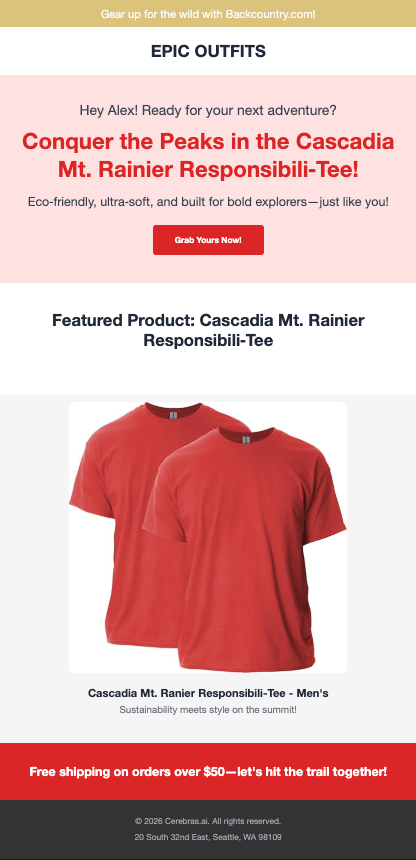
content1, time1, usage1 = generate_and_display(users[0])
# Output: "Hey Alex, ready for your next adventure?" - casual greeting in English

# Spanish, friendly, balanced user  
content2, time2, usage2 = generate_and_display(users[1])
# Output: "¡Hola Maria!" - friendly greeting in Spanish

# German, formal, introverted user
content3, time3, usage3 = generate_and_display(users[2])
# Output: "Sehr geehrter Herr Klaus," - formal greeting in German
```

### Example Results

Here are three personalized pages generated for different users:

<img src="https://mintcdn.com/cerebras-inference/9XQvKZ-k4Ip63gMw/images/cookbook/hyper-personalization-email1.png?fit=max&auto=format&n=9XQvKZ-k4Ip63gMw&q=85&s=dc03b9e2cfd2d0ee270cb20519a64fea" alt="Personalized page for Alex - casual English with red accent" width="416" height="860" data-path="images/cookbook/hyper-personalization-email1.png" />

*Alex's page: Casual tone, English, red accent color, extroverted personality*
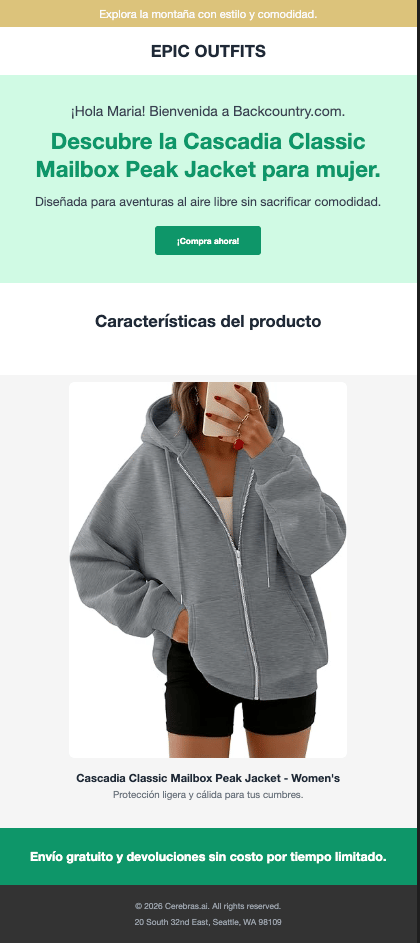
<img src="https://mintcdn.com/cerebras-inference/9XQvKZ-k4Ip63gMw/images/cookbook/hyper-personalization-email2.png?fit=max&auto=format&n=9XQvKZ-k4Ip63gMw&q=85&s=199ce8a62feb82e0b3f5aa92b49d69f7" alt="Personalized page for Maria - friendly Spanish with green accent" width="420" height="943" data-path="images/cookbook/hyper-personalization-email2.png" />

*Maria's page: Friendly tone, Spanish, green accent color, balanced personality*
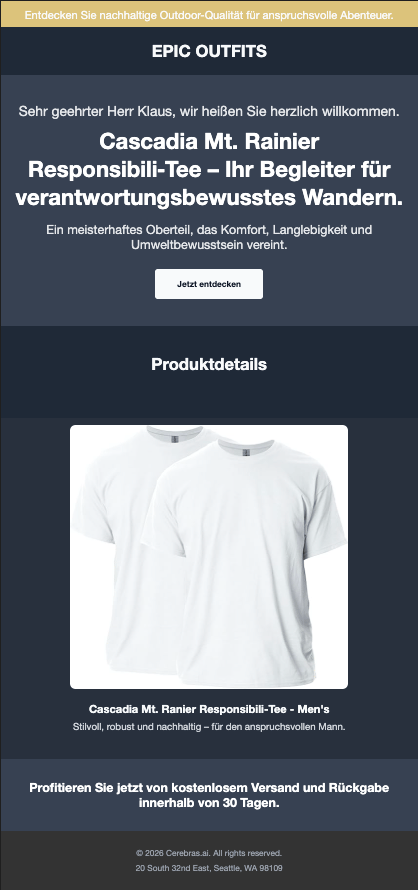
<img src="https://mintcdn.com/cerebras-inference/9XQvKZ-k4Ip63gMw/images/cookbook/hyper-personalization-email3.png?fit=max&auto=format&n=9XQvKZ-k4Ip63gMw&q=85&s=026f7f364d26ca1771fc227f0a97e81b" alt="Personalized page for Klaus - formal German with white accent" width="418" height="890" data-path="images/cookbook/hyper-personalization-email3.png" />

*Klaus's page: Formal tone, German, white accent color, introverted personality*

### Why This Matters

Research shows that hyper-personalization significantly increases user engagement. According to Zarouali et al. (2020), personalized content that adapts to individual preferences including tone, and messaging leads to **higher perceived relevance and stronger behavioral intentions** compared to generic content.

With Cerebras' ultra-fast inference, this level of personalization becomes practical for real-time web experiences. What used to require batch processing or slow generation can now happen at page-load speed, creating truly dynamic user experiences.

## Performance

| Metric                     | Value                                                      |
| -------------------------- | ---------------------------------------------------------- |
| Average generation time    | \~0.4s per page                                            |
| Tokens per page            | \~800-900                                                  |
| Languages supported        | English, Spanish, German (extensible)                      |
| Personalization dimensions | 6 (language, tone, personality, color, gender, background) |

Cerebras enables real-time personalization at scale—generate thousands of unique pages per minute.

```python theme={null}
print("\n" + "="*60)
print("⚡ CEREBRAS PERFORMANCE SUMMARY")
print("="*60)

times, tokens = [], 0
for i, user in enumerate(users):
    content, elapsed, usage = generate_page_content(user)
    times.append(elapsed)
    tokens += usage['total_tokens']
    lang = LANGUAGE_MAP.get(user.preferred_language, "en")[:2]
    print(f"User {i+1}: {lang} | {user.tone} | {user.personality} → {elapsed:.2f}s")

print(f"\n📊 Average: {sum(times)/len(times):.2f}s per page")
print(f"📊 Total: {sum(times):.2f}s for {len(users)} pages")
print(f"📊 Tokens: {tokens} total ({tokens//len(users)} avg)")
print(f"\n🚀 Real-time personalization at scale!")
```

## Summary

### What We Built

A **hyper-personalized web page system** where pages adapt to each visitor:

* **Preferred colors** - Visual styling matches user preferences
* **Tone & personality** - Content adapts from formal to casual
* **Products** - Featured items match user demographics
* **Language** - Full multilingual support

All powered by **Cerebras' ultra-fast inference** (\~0.4s per page), making real-time personalization practical at scale.

### Key Patterns

1. **Schema-constrained generation**: Use `response_format` with JSON schema for reliable outputs
2. **Pydantic validation**: Validate all LLM responses before use
3. **Template separation**: LLM generates text, templates handle layout/styling
4. **Concise prompts**: Shorter prompts reduce latency and cost

### Next Steps

* Add A/B testing for different content variations
* Implement click tracking and conversion analytics
* Add more personalization dimensions (purchase history, browsing behavior)
* Deploy as a real-time API for e-commerce personalization

### Resources

* [Cerebras Inference Docs](https://inference-docs.cerebras.ai)
* [Pydantic Docs](https://docs.pydantic.dev)
* [Jinja2 Docs](https://jinja.palletsprojects.com)
* [Zarouali, B., Dobber, T., De Pauw, G., & de Vreese, C. (2020)](https://doi.org/10.1177/0093650220961965)

### Acknowledgements

Thank you to the Cerebras team, particularly, Ryan, Ryann, and Neeraj, for their support and feedback during the development of this cookbook.