> ## Documentation Index
> Fetch the complete documentation index at: https://inference-docs.cerebras.ai/llms.txt
> Use this file to discover all available pages before exploring further.

# Migrate to GLM 4.7

> Learn how to migrate to Z.ai GLM 4.7 on the Cerebras API, including reasoning controls, streaming, and updated limits.

<Tip>
  **What’s new in GLM 4.7**

  GLM 4.7 introduces key improvements over 4.6:

  * Enhanced coding performance and agentic tool usage
  * Stronger reasoning capabilities
  * Improved role play and general chat quality

  GLM 4.7 is now the top open-source model on the <a className="font-semibold underline underline-offset-4 decoration-orange-500 decoration-1 hover:decoration-2" href="https://artificialanalysis.ai/#artificial-analysis-intelligence-index" target="_blank" rel="noopener noreferrer">Artificial Analysis Intelligence Index</a>, surpassing Kimi K2 Thinking and DeepSeek 3.2. It leads on benchmarks like tau-bench and SWE-bench. The architecture is unchanged, with just updated weights and new API features, making migration straightforward.
</Tip>

This guide covers how to update your API calls, parameters, and prompts for GLM 4.7.

## Model Overview

* **Architecture:** Built on the GLM-4.x foundation using a **Mixture-of-Experts (MoE) Transformer** architecture.
* **Efficiency:** **358.0B** total parameters, with \~**32B** active per forward pass via MoE routing.
* **Open source:** Released under an **MIT-style permissive license**, enabling fine-tuning, self-hosting, and flexible deployment, subject to the terms in the official repository.
* **Data privacy:** When you run GLM 4.7 on Cerebras Inference, your inputs and outputs are processed in memory and never persisted.

<div className="bg-white dark:bg-zinc-950 border border-zinc-200 dark:border-zinc-800 rounded-xl p-6 not-prose">
  <p className="text-sm leading-relaxed text-zinc-700 dark:text-zinc-300">
    GLM 4.7 is a foundation model from Zhipu AI (Z.ai) built for coding and agentic workflows. It offers strong code generation, reasoning, and tool-use capabilities, along with new thinking controls (interleaved, preserved, and turn-level) that improve stability in multi-turn tasks.
  </p>

  <div className="mt-6 grid grid-cols-2 md:grid-cols-3 gap-6">
    <div className="text-center">
      <div className="text-xs font-mono font-semibold tracking-wider text-zinc-500 dark:text-zinc-400 mb-2 uppercase">Cerebras Model ID</div>
      <div className="text-lg font-semibold text-zinc-900 dark:text-white">zai-glm-4.7</div>
    </div>

    <div className="text-center">
      <div className="text-xs font-mono font-semibold tracking-wider text-zinc-500 dark:text-zinc-400 mb-2 uppercase">Context</div>
      <div className="text-lg font-semibold text-zinc-900 dark:text-white">131k</div>
      <div className="text-xs text-zinc-600 dark:text-zinc-400">(131,072 tokens)</div>
    </div>

    <div className="text-center">
      <div className="text-xs font-mono font-semibold tracking-wider text-zinc-500 dark:text-zinc-400 mb-2 uppercase">Max output</div>
      <div className="text-lg font-semibold text-zinc-900 dark:text-white">40k</div>
      <div className="text-xs text-zinc-600 dark:text-zinc-400">max\_completion\_tokens</div>
    </div>
  </div>
</div>

## Benchmark Performance

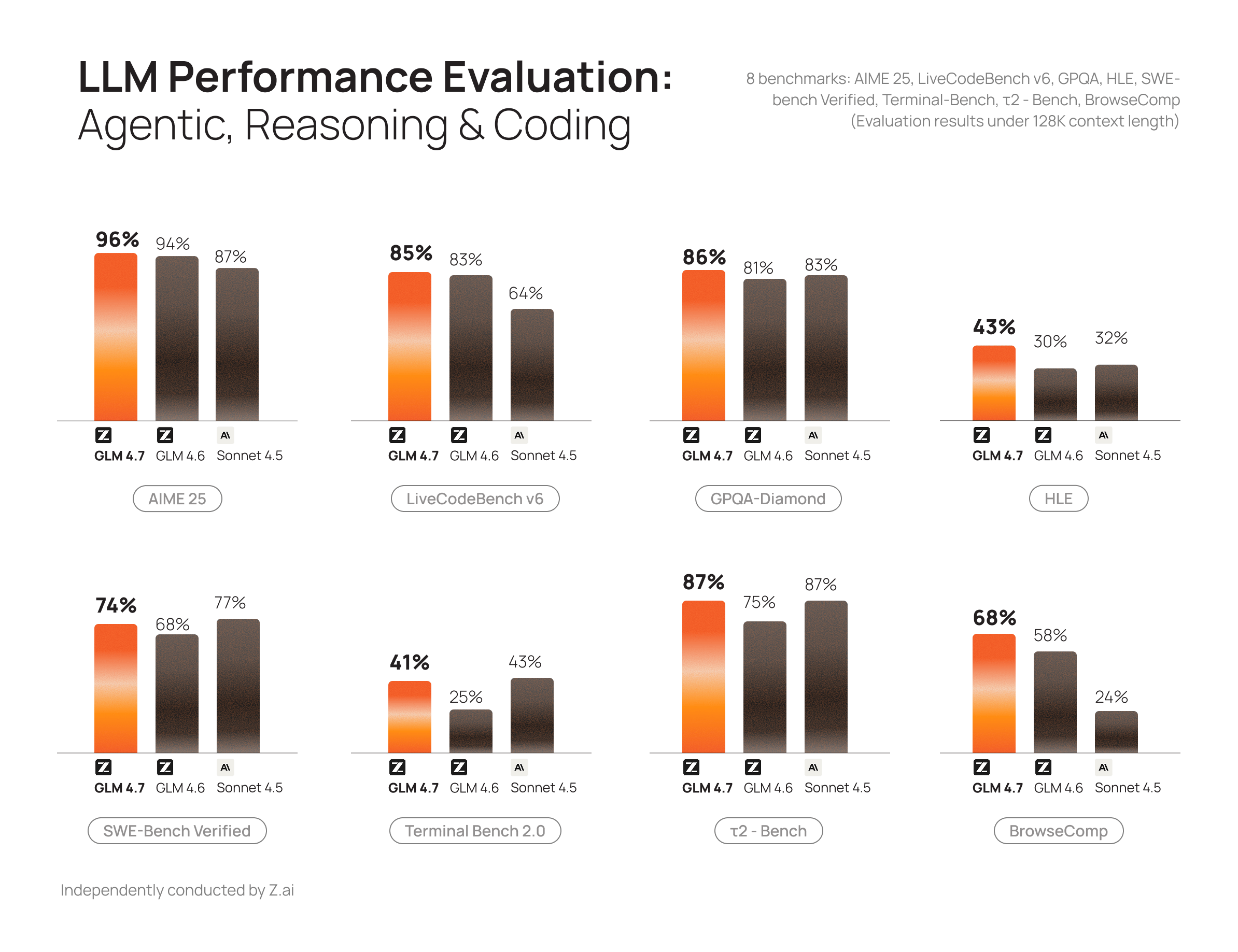
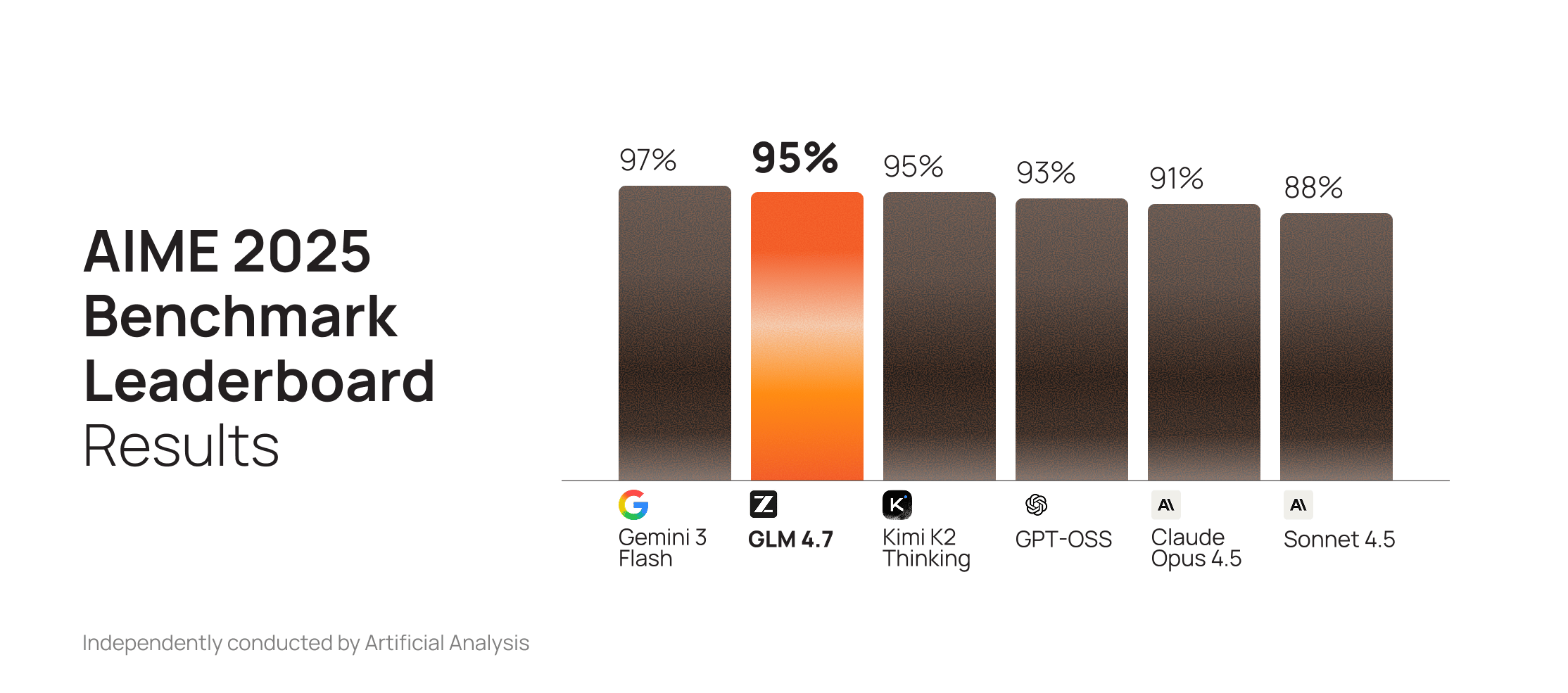
GLM 4.6 was already a top-performing open model for code generation. GLM 4.7 extends that lead with substantial gains on GPQA and AIME, outperforming Claude Sonnet 4.5 on both.

<img src="https://mintcdn.com/cerebras-inference/v0mgoSERKYHPC_of/images/glm4.7/aime2025.png?fit=max&auto=format&n=v0mgoSERKYHPC_of&q=85&s=8c1d9af82a8254df025a46f3152f2e7d" alt="GLM 4.7 performance on AIME (Artificial Analysis chart)" width="2228" height="985" data-path="images/glm4.7/aime2025.png" />

Source: [Artificial Analysis Intelligence Index](https://artificialanalysis.ai/#artificial-analysis-intelligence-index) (as of 12/30/25)

On LiveCodeBench, GLM 4.7 outperforms Anthropic and OpenAI models, trailing only Gemini 3.
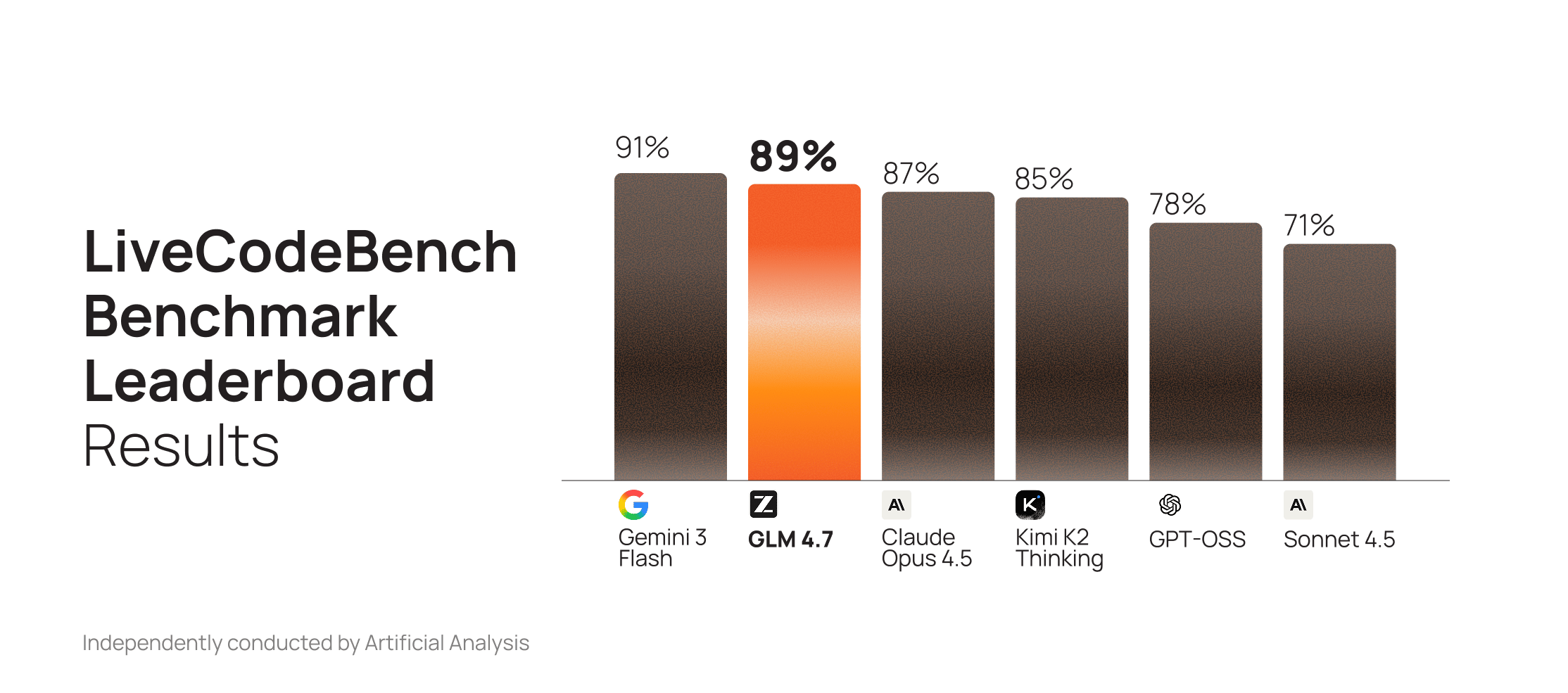
<img src="https://mintcdn.com/cerebras-inference/v0mgoSERKYHPC_of/images/glm4.7/livecodebench.png?fit=max&auto=format&n=v0mgoSERKYHPC_of&q=85&s=d81fc3501961b39e2dc4518c6bd83b44" alt="GLM 4.7 performance on LiveCodeBench (Artificial Analysis chart)" width="2228" height="985" data-path="images/glm4.7/livecodebench.png" />

Source: [Artificial Analysis Intelligence Index](https://artificialanalysis.ai/#artificial-analysis-intelligence-index) (as of 12/30/25)

The model also improves significantly in chat, creative writing, and role-play.

<img src="https://mintcdn.com/cerebras-inference/v0mgoSERKYHPC_of/images/glm4.7/llm-perfomance.png?fit=max&auto=format&n=v0mgoSERKYHPC_of&q=85&s=6eedbda592b70f1a37daccde879c5764" alt="GLM 4.7 compared to GLM 4.6 (performance overview)" width="2388" height="1837" data-path="images/glm4.7/llm-perfomance.png" />

Source: [Z.ai — GLM 4.7](https://z.ai/blog/glm-4.7)

# Migration Checklist

**Model and parameters**

* Set `model` to `zai-glm-4.7`
* Keep defaults unless you have a reason: `temperature=1`, `top_p=0.95`
* For deterministic outputs, adjust **either** `temperature` **or** `top_p`, not both

**Reasoning**

* Reasoning is enabled by default
* To disable: `reasoning_effort="none"` (`disable_reasoning` is deprecated as of March 24, 2026)
* To preserve traces (recommended for agentic/coding workflows): `clear_thinking: false`

**Limits**

* `max_completion_tokens`: up to 40k
* Context window: \~131k tokens

**Validation**

* Test against real workloads for randomness, latency, tool-call parsing, and long-context behavior

## API Examples

<Tabs>
  <Tab title="Model">
    To test the new model, update `model` to `zai-glm-4.7`.

    ```python theme={null}
    import os
    from cerebras.cloud.sdk import Cerebras

    client = Cerebras(api_key=os.environ.get("CEREBRAS_API_KEY"))

    resp = client.chat.completions.create(
      model="zai-glm-4.7",
      messages=[{"role": "user", "content": "Briefly describe the advantages of GLM 4.7."}],
    )

    print(resp.choices[0].message.content)
    ```
  </Tab>

  <Tab title="Sampling">
    Z.ai recommends `temperature=1.0` and `top_p=0.95` by default and suggests adjusting only one at a time. The same defaults apply here.

    ```python theme={null}
    import os
    from cerebras.cloud.sdk import Cerebras

    client = Cerebras(api_key=os.environ.get("CEREBRAS_API_KEY"))

    # Plan A: use temperature
    resp = client.chat.completions.create(
      model="zai-glm-4.7",
      messages=[{"role": "user", "content": "Write a more creative brand introduction."}],
      temperature=1.0,
    )

    # Plan B: use top_p
    resp = client.chat.completions.create(
      model="zai-glm-4.7",
      messages=[{"role": "user", "content": "Generate stable technical documentation."}],
      top_p=0.8,
    )
    ```
  </Tab>

  <Tab title="Reasoning">
    GLM 4.7 supports advanced thinking controls. On the Cerebras API:

    * To disable reasoning entirely: `reasoning_effort="none"` (`disable_reasoning` is deprecated)
    * To preserve reasoning traces across turns (requires reasoning enabled): `clear_thinking=false`

    For more details on how reasoning tokens appear in responses (streaming vs non-streaming), see [Reasoning](/capabilities/reasoning).

    ```python theme={null}
    import os
    from cerebras.cloud.sdk import Cerebras

    client = Cerebras(api_key=os.environ.get("CEREBRAS_API_KEY"))

    resp = client.chat.completions.create(
      model="zai-glm-4.7",
      messages=[{"role": "user", "content": "Design a three-tier microservice architecture."}],
      stream=False,
      max_completion_tokens=40_000,
      reasoning_effort="none",  # Disables reasoning
      clear_thinking=False,
      temperature=1,
      top_p=0.95,
    )

    print(resp.choices[0].message.content)
    ```
  </Tab>

  <Tab title="OpenAI">
    The OpenAI SDK supports custom parameters through `extra_body`. Use this for GLM-specific options like `clear_thinking`. Note that `reasoning_effort` is a standard OpenAI parameter and does not require `extra_body`.

    ```python theme={null}
    # pip install openai
    import os
    from openai import OpenAI

    client = OpenAI(
      api_key=os.environ.get("CEREBRAS_API_KEY"),
      base_url="https://api.cerebras.ai/v1",
    )

    resp = client.chat.completions.create(
      model="zai-glm-4.7",
      messages=[{"role": "user", "content": "Design a three-tier microservice architecture."}],
      stream=False,
      max_completion_tokens=40_000,
      temperature=1,
      top_p=0.95,
      reasoning_effort="none",
      extra_body={
        "clear_thinking": False,
      },
    )

    print(resp.choices[0].message.content)
    ```
  </Tab>

  <Tab title="Streaming">
    Use `stream=true` for incremental output. If reasoning traces are enabled and preserved, they may appear in the streaming `delta.reasoning` field (not `delta.reasoning_content`).

    If you use tool calling with streaming, be prepared to concatenate partial `delta.tool_calls[*].function.arguments` chunks.

    ```python theme={null}
    import os
    from cerebras.cloud.sdk import Cerebras

    client = Cerebras(api_key=os.environ.get("CEREBRAS_API_KEY"))

    stream = client.chat.completions.create(
      model="zai-glm-4.7",
      messages=[{"role": "user", "content": "Write a concise migration plan."}],
      stream=True,
      max_completion_tokens=4_000,
      clear_thinking=False,
    )

    for chunk in stream:
      delta = chunk.choices[0].delta
      if getattr(delta, "reasoning", None):
        print(delta.reasoning, end="")
      if getattr(delta, "content", None):
        print(delta.content, end="")
    ```
  </Tab>
</Tabs>

## Migration Best Practices

When migrating to GLM 4.7, a common mistake is reusing old prompts without adjusting them for the model's preferred prompting style and reasoning/streaming behavior.

To fully leverage this model's strengths, refine prompts, tool-calling flows, and sampling parameters accordingly.

<AccordionGroup>
  <Accordion title="1. Front-load instructions">
    GLM 4.7 places heightened attention on the **beginning** of the prompt. To ensure consistent instruction following, place all required rules, constraints, and behavioral instructions at the beginning of the system prompt.

    GLM 4.7 supports long context (up to \~131k on Cerebras), but instruction-following quality typically peaks at much shorter lengths and can degrade near the maximum.

    This is especially important when using prompting patterns that rely on "think" tags.
  </Accordion>

  <Accordion title="2. Use clear and direct instructions">
    GLM 4.7 responds more reliably to explicit rules than to suggestive or optional language.

    * Use unambiguous terms such as **MUST, REQUIRED,** or **STRICTLY.**
    * Avoid soft phrasing such as "Please try to…" or indirect suggestions.

    For example:

    * **Do**: "Before writing any code, you MUST first read and fully comprehend the `architecture.md` file. All code you generate must strictly conform…"
    * **Don't**: "Please read and follow my `architecture.md`..."
  </Accordion>

  <Accordion title="3. Specify a default language">
    Because GLM 4.7 is multilingual, it may occasionally switch languages if not instructed otherwise. Explicit language control prevents this behavior.

    Add a directive like **"Always respond in English"** (or your preferred language) in your system prompt to prevent unexpected responses or reasoning traces in other languages.
  </Accordion>

  <Accordion title="4. Use role prompts intentionally">
    GLM 4.7 follows roles and personas closely. Assigning clear roles improves consistency and accuracy.

    Example: `"You are a senior software architect. Review the following specifications and produce a structured design proposal."`

    Role-based prompting also works well in multi-agent systems, with each agent having its own persona.
  </Accordion>

  <Accordion title="5. Use critic agents for validation">
    When building agentic systems, rather than relying on a single agent to both generate and validate code, create dedicated critics to review and validate outputs before allowing the main agentic flow to advance in its plan.

    These could include:

    * **Code reviewer**: A sub-agent configured to rigorously check for code quality, adherence to SOLID/DRY/YAGNI principles, and maintainability issues.
    * **QA tester**: Potentially bound with agentic browser capabilities to test user flows, edge cases, and integration points.
    * **Security reviewer**: Specialized in identifying vulnerabilities, unsafe patterns, and compliance issues.
    * **Performance analyst**: Focused on detecting performance bottlenecks, inefficient algorithms, or resource leaks.

    This pattern improves reliability and aligns well with GLM 4.7's behavior. Multi-agent frameworks like Code Puppy, KiloCode, and others support this approach.
  </Accordion>

  <Accordion title="6. Break down tasks">
    Even with improved stability and thinking controls, you will generally get better reliability by breaking complex work into small, well-defined substeps.

    For example:

    1. List dependencies
    2. Propose new structure
    3. Generate code
    4. Verify output
  </Accordion>

  <Accordion title="7. Minimize reasoning when not needed">
    GLM 4.7 may generate verbose reasoning blocks that are unnecessary and slow down responses.

    Treat reasoning as a resource: disable it for simple tasks to reduce latency, and preserve it only when it improves quality or your workflow depends on it.

    We recommend the following:

    * **Disable reasoning** with `reasoning_effort="none"`. See our [Reasoning](/capabilities/reasoning) guide for more information. <Note>This is different from the `thinking` parameter that Z.ai uses in their API.</Note>
    * **Preserve reasoning traces** with `clear_thinking: false` for agentic/coding workflows and prompt caching use cases.
    * **Set appropriate `max_completion_tokens` limits**. For focused responses, consider using lower values.
    * **Use prompt-based control** by adding instructions to minimize reasoning in your system prompt. For example: "Reason only when necessary" or "Skip reasoning for straightforward tasks."
    * **Use structured output formats** (JSON, lists, bullets) that naturally discourage verbose reasoning blocks.
  </Accordion>

  <Accordion title="8. Enable enhanced reasoning for complex tasks">
    For tasks requiring deeper analysis:

    * Ensure `reasoning_effort` is not set to `"none"`.
    * Add reasoning directives such as:
      * "Think step by step."
      * "Break the problem down logically."
    * Include examples that demonstrate the reasoning process you want, showing the model how to work through problems methodically.
  </Accordion>

  <Accordion title="9. Combine GLM 4.7 with frontier models when needed">
    If your workload includes tasks requiring frontier-level reasoning accuracy, consider hybrid architectures:

    1. Route simpler tasks to GLM 4.7 and use a frontier model for more complex queries.
    2. Use GLM 4.7 as a fast agent that loops in frontier models only when needed.
    3. Use a frontier model to create a plan, then execute it rapidly with GLM 4.7.

    This approach reduces cost and latency while maintaining high accuracy where required.
  </Accordion>

  <Accordion title="10. Tune sampling parameters">
    Parameter tuning has a significant impact on output quality. The recommended defaults from Z.ai and Cerebras are:

    | Parameter       | Recommended Range                           | Notes                                                                                                                                                                                                          |
    | --------------- | ------------------------------------------- | -------------------------------------------------------------------------------------------------------------------------------------------------------------------------------------------------------------- |
    | **temperature** | 1.0 (general) / 0.8 (instruction following) | When thinking is enabled, avoid setting temperature below 0.8 as this can degrade output quality. If your use case requires more deterministic outputs (temperature \< 0.8), you should also disable thinking. |
    | **top\_p**      | 0.95                                        | Balanced default.                                                                                                                                                                                              |

    On Cerebras, adjust these parameters via the API:

    ```python highlight={6-7} theme={null}
    completion_create_response = client.chat.completions.create(
        messages=[{"role": "user", "content": "Explain how photosynthesis works."}],
        model="zai-glm-4.7",
        stream=False,
        max_completion_tokens=40_000,
        temperature=1,
        top_p=0.95,
        clear_thinking=False,
    )
    ```
  </Accordion>
</AccordionGroup>

## Q\&A

<Tabs>
  <Tab title="Reasoning & thinking">
    <AccordionGroup>
      <Accordion title="How do I configure the reasoning?">
        Use `reasoning_effort="none"` to disable reasoning on GLM 4.7. (`disable_reasoning` is deprecated as of March 24, 2026.)

        We also support ZAI’s “preserved thinking” behavior via `clear_thinking`, which controls whether reasoning content is cleared or retained across turns in multi-turn workflows (including tool-calling loops).

        * `[Default]` Exclude thinking from earlier turns: `clear_thinking: true`
        * `[Recommended for coding/agentic + better cache hit rates]` Preserve thinking from previous turns: `clear_thinking: false`

        ```python theme={null}
        resp = client.chat.completions.create(
          model="zai-glm-4.7",
          messages=[{"role": "user", "content": "Help me refactor this function."}],
          temperature=1,
          top_p=0.95,
          reasoning_effort="none",  # Omit or remove to enable reasoning
          clear_thinking=False,
        )
        ```
      </Accordion>

      <Accordion title="What is clear_thinking?">
        Starting with GLM 4.5, Z.ai introduced support for **Interleaved Thinking**, allowing the model to think between tool calls and after receiving tool results. GLM 4.7 further enhances Interleaved Thinking and introduces **Preserved Thinking** and **Turn-level Thinking**.

        | Feature              |      GLM-4.5 |     GLM-4.6 |    GLM-4.7 |
        | -------------------- | -----------: | ----------: | ---------: |
        | Interleaved Thinking | ✅ Introduced | ✅ Supported | ✅ Enhanced |
        | Preserved Thinking   |            ❌ |           ❌ |      ✅ New |
        | Turn-level Thinking  |            ❌ |           ❌ |      ✅ New |

        * **Preserved Thinking (`clear_thinking: false`)**: retain reasoning across turns for multi-step coding/agentic workflows
        * **Note**: Setting `clear_thinking: false` can improve cache hit rate in agent loops
      </Accordion>

      <Accordion title="What is Preserved Thinking?">
        Preserved Thinking is the ability to maintain a model’s reasoning context across multiple API calls, particularly during multi-step tool-calling workflows. Without it, when you send tool results back to the model, it may need to re-derive its approach from scratch, which can introduce inconsistencies.

        Enable preserved thinking with `zai-glm-4.7` by setting `clear_thinking: false` (it’s `true` by default).

        This is becoming a common pattern for production agents across providers, though each implements it differently (for example: encrypted “thought tokens”, server-side state, or stateless encrypted blobs).
      </Accordion>
    </AccordionGroup>
  </Tab>

  <Tab title="Model & use cases">
    <AccordionGroup>
      <Accordion title="Why does GLM-4.7 matter?">
        GLM-4.7 is a top-tier open model that targets state-of-the-art performance on agentic and coding applications in real workloads. It offers high coding precision, strong tool use, and very high generation speed—while keeping open weights.
      </Accordion>

      <Accordion title="Why will GLM-4.7 be a strong coding model?">
        GLM-4.7 performs well across benchmark tasks and real-world coding flows (code generation, editing, and tool-based agent loops), while producing readable, human-like output.
      </Accordion>

      <Accordion title="What are its best use cases?">
        * Live coding assistants
        * Debugging and refactoring agents
        * Chat + RAG workflows
        * Tool-using agents (when you provide tool schemas)
      </Accordion>
    </AccordionGroup>
  </Tab>

  <Tab title="Limits & parameters">
    <AccordionGroup>
      <Accordion title="What’s the API model ID?">
        Use `zai-glm-4.7` with the Cerebras Chat Completions API.
      </Accordion>

      <Accordion title="What parameters should I use?">
        Recommended defaults:

        * `temperature: 1.0`
        * `top_p: 0.95`
        * `clear_thinking: false` for coding/agentic workflows (and improved cache hit rates)

        If verbosity is an issue, set `reasoning_effort="none"` and/or reduce `max_completion_tokens`.
      </Accordion>

      <Accordion title="What’s the context window size?">
        Cerebras supports up to **131k-token context (131,072 tokens)** per request.
      </Accordion>
    </AccordionGroup>
  </Tab>

  <Tab title="Tools, streaming, caching">
    <AccordionGroup>
      <Accordion title="How does our tool streaming work?">
        We don’t support `tool_stream=true`. We do support `stream=true`.

        For tool calls, our streaming behavior is:

        * Stream reasoning and/or text token-by-token (as available)
        * Stream tool call payloads as a single chunk (same limitation as other models)
      </Accordion>

      <Accordion title="Can I cache prompts?">
        Yes. Prompt caching is supported for enterprise users. Contact your Cerebras Solutions Architect to enable it on your workspace.

        Learn more: [Prompt Caching](/capabilities/prompt-caching)
      </Accordion>

      <Accordion title="Does it use tools?">
        Yes—GLM-4.7 supports tool calling via the standard `tools=[...]` schema. You define the tools and arguments schema; the model decides when to call them.

        Learn more: [Tool Calling](/capabilities/tool-use)
      </Accordion>
    </AccordionGroup>
  </Tab>

  <Tab title="Benchmarks (3rd party)">
    <AccordionGroup>
      <Accordion title="How does GLM 4.7 perform on 3rd party evaluations?">
        As of Dec 30, 2025, GLM 4.7 is reported as:

        | Source                | Eval(s)                                                                                                                                  | Overall Position | Position Among Open Models | Score |
        | --------------------- | ---------------------------------------------------------------------------------------------------------------------------------------- | ---------------: | -------------------------: | ----: |
        | AA Agentic Index      | Terminal-Bench Hard, 𝜏²-Bench Telecom                                                                                                   |        3rd (tie) |                        1st |    63 |
        | AA Intelligence Index | MMLU-Pro, GPQA Diamond, Humanity's Last Exam, LiveCodeBench, SciCode, AIME 2025, IFBench, AA-LCR, Terminal-Bench Hard, 𝜏²-Bench Telecom |              6th |                        1st |    68 |
        | AA Coding Index       | LiveCodeBench, SciCode, Terminal-Bench Hard                                                                                              |              7th |                        1st |    55 |
      </Accordion>

      <Accordion title="How does it compare to closed models?">
        On many development tasks, GLM-4.7 can be comparable to frontier models, while often being significantly faster. On the most complex reasoning-heavy code tasks, developers may still prefer the strongest frontier models.

        <img src="https://mintcdn.com/cerebras-inference/v0mgoSERKYHPC_of/images/glm4.7/llm-perfomance.png?fit=max&auto=format&n=v0mgoSERKYHPC_of&q=85&s=6eedbda592b70f1a37daccde879c5764" alt="GLM 4.7 compared to GLM 4.6 (performance overview)" width="2388" height="1837" data-path="images/glm4.7/llm-perfomance.png" />
      </Accordion>
    </AccordionGroup>
  </Tab>
</Tabs>

## Credits

These guides are written with the wonderful contributions of our community Discord users—namely Autoshot (Jan Feddersen), Sewer56, and many others.

## Next Steps

* [Explore available models](/models/overview) - Pricing, rate limits, and capabilities
* [Get an API key](https://cloud.cerebras.ai?utm_source=devx\&utm_campaign=migrationguide) - Test GLM 4.7 in our API playground
* [Join the Cerebras Discord](https://discord.gg/a5TYzrJ444) - Share feedback, observations, and best practices with other developers
