This cookbook demonstrates how to build hyper-personalized web pages that adapt to each visitor in real-time:
- Preferred colors - Pages render in the user’s chosen color scheme
- Tone - Content adjusts to formal, casual, or friendly language
- Products - Featured items match user interests and demographics
- Language - Full multilingual support (English, Spanish, German)
Cerebras’ ultra-fast inference makes this possible at page-load speed—personalization that would take seconds with other providers happens in milliseconds.
What You’ll Learn
- Pydantic Structured Outputs - Constraining LLM responses to valid JSON schemas
- Cerebras Integration - Ultra-fast inference for real-time page personalization
- Template Separation - LLM generates content, templates handle layout/styling
- Multi-dimensional Personalization - Language, tone, personality, colors, products
Setup
Install Dependencies
%pip install -q cerebras-cloud-sdk pydantic jinja2 pandas python-dotenv
Clone the Repository
This cookbook requires assets (images, templates, user data). Clone the full repository to run the notebook:
git clone https://github.com/Cerebras/Cerebras-Inference-Cookbook.git
cd Cerebras-Inference-Cookbook/agents
The hyper_personalization_assets/ directory contains:
data/users.csv - Sample user profiles with personalization preferences
templates/email_template.html - Jinja2 HTML template for rendering
images/ - Product images in different color variants
constants.py - Configuration constants (colors, languages, guidance)
Load API Keys
Get your Cerebras API key at https://cloud.cerebras.ai (free tier available).
CEREBRAS_API_KEY=your-key-here
import os
from dotenv import load_dotenv
from cerebras.cloud.sdk import Cerebras
# Import all constants from our config file
from hyper_personalization_assets.constants import (
MODEL, PRODUCT_NAMES, PRODUCT_IMAGES, LANGUAGE_MAP,
COLOR_SCHEMES, PERSONALITY_GUIDANCE, TONE_GUIDANCE
)
load_dotenv()
client = Cerebras(
api_key=os.environ.get("CEREBRAS_API_KEY"),
default_headers={"X-Cerebras-3rd-Party-Integration": "hyper-personalization"}
)
print(f"✅ Cerebras client initialized with model: {MODEL}")
Part 1: Pydantic Schemas
Pydantic schemas ensure the LLM returns structured, validated JSON. This is crucial for reliable template rendering.
from typing import List
from pydantic import BaseModel, Field
class UserProfile(BaseModel):
"""User profile loaded from CSV - defines personalization dimensions."""
user_id: str
name: str = Field(description="User's first name")
preferred_color: str = Field(description="red, green, or white")
preferred_language: str = Field(description="en, sp, or de")
gender: str = Field(description="male or female")
tone: str = Field(description="formal, casual, or friendly")
personality: str = Field(description="introverted, extroverted, or balanced")
background_mode: str = Field(description="bright or dark")
class PageContent(BaseModel):
"""Structured output schema - the LLM must return exactly these fields."""
greeting: str = Field(description="Personalized greeting using the user's name")
banner_text: str = Field(description="Short promotional banner text")
headline: str = Field(description="Main headline, attention-grabbing")
subheadline: str = Field(description="Supporting subheadline")
cta_text: str = Field(description="Call-to-action button text")
product_section_title: str = Field(description="Title for product section")
product_tagline: str = Field(description="Short tagline for the featured product")
promo_message: str = Field(description="Promotional message at bottom")
print("✅ Pydantic schemas defined")
Why Pydantic Schemas Matter
| Benefit | Description |
|---|
| Type Safety | Validates LLM output matches expected structure |
| Auto-documentation | Field descriptions guide the LLM |
| Error Handling | Catches malformed responses before rendering |
| IDE Support | Autocomplete and type hints in your code |
Part 2: Configuration Constants
The constants are imported from hyper_personalization_assets/constants.py. Here’s what they define:
# Language mapping
LANGUAGE_MAP = {
"en": "English",
"sp": "Spanish",
"de": "German"
}
# Tone guidance for the LLM
TONE_GUIDANCE = {
"formal": "Use professional, respectful language. Address the user formally.",
"casual": "Use relaxed, friendly language. Feel free to use contractions.",
"friendly": "Be warm and approachable. Use encouraging, positive language."
}
# Personality guidance
PERSONALITY_GUIDANCE = {
"introverted": "Keep messaging concise and informative. Focus on product details.",
"extroverted": "Use energetic, enthusiastic language. Emphasize social aspects.",
"balanced": "Strike a balance between informative and engaging content."
}
# Color schemes for page styling
COLOR_SCHEMES = {
("red", "bright"): {"bg_color": "#ffffff", "accent_color": "#dc2626", "text_color": "#1f2937"},
("red", "dark"): {"bg_color": "#1f2937", "accent_color": "#ef4444", "text_color": "#f9fafb"},
("green", "bright"): {"bg_color": "#ffffff", "accent_color": "#16a34a", "text_color": "#1f2937"},
("green", "dark"): {"bg_color": "#1f2937", "accent_color": "#22c55e", "text_color": "#f9fafb"},
("white", "bright"): {"bg_color": "#ffffff", "accent_color": "#6b7280", "text_color": "#1f2937"},
("white", "dark"): {"bg_color": "#1f2937", "accent_color": "#9ca3af", "text_color": "#f9fafb"},
}
Part 3: Content Generation Function
This function calls the Cerebras API with a structured output schema. The LLM is constrained to return valid JSON matching our PageContent schema.
import json
import time
def generate_page_content(user: UserProfile) -> tuple[PageContent, float, dict]:
"""Generate personalized page content using Cerebras.
Returns: (content, elapsed_time, usage_stats)
"""
language = LANGUAGE_MAP.get(user.preferred_language, "English")
product_name = PRODUCT_NAMES.get(user.gender, PRODUCT_NAMES["male"])
# Concise prompt to minimize tokens while providing clear instructions
prompt = f"""Generate page content for Backcountry.com.
USER: {user.name} | {language} | {user.tone} | {user.personality}
PRODUCT: {product_name}
TONE: {TONE_GUIDANCE.get(user.tone, '')}
STYLE: {PERSONALITY_GUIDANCE.get(user.personality, '')}
Write ALL content in {language}. Keep each field concise (1-2 sentences max)."""
# Generate JSON schema directly from Pydantic model
schema = PageContent.model_json_schema()
start_time = time.perf_counter()
response = client.chat.completions.create(
model=MODEL,
messages=[{"role": "user", "content": prompt}],
response_format={
"type": "json_schema",
"json_schema": {
"name": "page_content",
"strict": True,
"schema": schema
}
},
max_completion_tokens=2048,
temperature=0.7,
)
elapsed = time.perf_counter() - start_time
# Parse response with error handling
raw_content = response.choices[0].message.content
if raw_content is None:
raise ValueError(f"LLM returned None. Finish reason: {response.choices[0].finish_reason}")
content_dict = json.loads(raw_content)
content = PageContent(**content_dict)
usage = {
"prompt_tokens": response.usage.prompt_tokens,
"completion_tokens": response.usage.completion_tokens,
"total_tokens": response.usage.total_tokens
}
return content, elapsed, usage
print("✅ Content generation function ready")
Key Implementation Details
- Schema-constrained generation: The
response_format parameter forces the LLM to return valid JSON
- Pydantic validation:
PageContent(**content_dict) validates the response
- Performance tracking: We measure generation time and token usage
- Concise prompts: Shorter prompts = faster inference
Part 4: Template Rendering
Jinja2 combines LLM-generated content with user-specific styling (colors, images) into the final HTML page.
from jinja2 import Template
import base64
def load_image_as_data_uri(path: str) -> str:
"""Convert image to data URI for inline HTML embedding."""
with open(path, "rb") as f:
data = base64.b64encode(f.read()).decode()
ext = path.split(".")[-1]
return f"data:image/{ext};base64,{data}"
def render_page(user: UserProfile, content: PageContent) -> str:
"""Render HTML page by combining content with user-specific styling."""
with open("hyper_personalization_assets/templates/email_template.html", "r") as f:
template = Template(f.read())
# Get color scheme based on user preferences
colors = COLOR_SCHEMES.get(
(user.preferred_color, user.background_mode),
COLOR_SCHEMES[("white", "bright")]
)
# Get product image
gender = user.gender if user.gender in PRODUCT_IMAGES else "male"
color = user.preferred_color if user.preferred_color in PRODUCT_IMAGES[gender] else "white"
product_image = load_image_as_data_uri(PRODUCT_IMAGES[gender][color])
product_name = PRODUCT_NAMES.get(user.gender, PRODUCT_NAMES["male"])
return template.render(
greeting=content.greeting,
banner_text=content.banner_text,
headline=content.headline,
subheadline=content.subheadline,
cta_text=content.cta_text,
product_section_title=content.product_section_title,
product_name=product_name,
product_tagline=content.product_tagline,
promo_message=content.promo_message,
product_image=product_image,
**colors
)
print("✅ Template rendering function ready")
Part 5: Load User Data
User profiles are loaded from CSV. Each user has unique preferences that drive personalization.
import pandas as pd
def load_users(csv_path: str = "hyper_personalization_assets/data/users.csv") -> List[UserProfile]:
"""Load user profiles from CSV into Pydantic models."""
df = pd.read_csv(csv_path)
return [UserProfile(**row.to_dict()) for _, row in df.iterrows()]
users = load_users()
print(f"✅ Loaded {len(users)} user profiles")
for u in users:
print(f" {u.name}: {u.preferred_language} | {u.preferred_color} | {u.tone} | {u.personality}")
Example output:
✅ Loaded 6 user profiles
Alex: en | red | casual | extroverted
Maria: sp | green | friendly | balanced
Klaus: de | white | formal | introverted
Emma: en | red | casual | extroverted
Jordan: en | green | friendly | balanced
Sofia: sp | white | formal | introverted
Part 6: Generate & Display
This helper orchestrates the full pipeline: generate content → render template → display inline.
from IPython.display import HTML, display
def generate_and_display(user: UserProfile):
"""Full pipeline: generate content, render template, display page."""
print(f"\n{'='*60}")
print(f"🎯 {user.name} | {LANGUAGE_MAP.get(user.preferred_language)} | {user.tone} | {user.personality}")
print(f"{'='*60}")
content, elapsed, usage = generate_page_content(user)
print(f"⚡ Generated in {elapsed:.2f}s | {usage['total_tokens']} tokens")
print(f"📝 Greeting: {content.greeting}")
print(f"📝 Headline: {content.headline}")
html = render_page(user, content)
display(HTML(html))
return content, elapsed, usage
Part 7: Generate Personalized Pages
Let’s generate pages for users with different language, tone, and personality combinations.
# English, casual, extroverted user
content1, time1, usage1 = generate_and_display(users[0])
# Output: "Hey Alex, ready for your next adventure?" - casual greeting in English
# Spanish, friendly, balanced user
content2, time2, usage2 = generate_and_display(users[1])
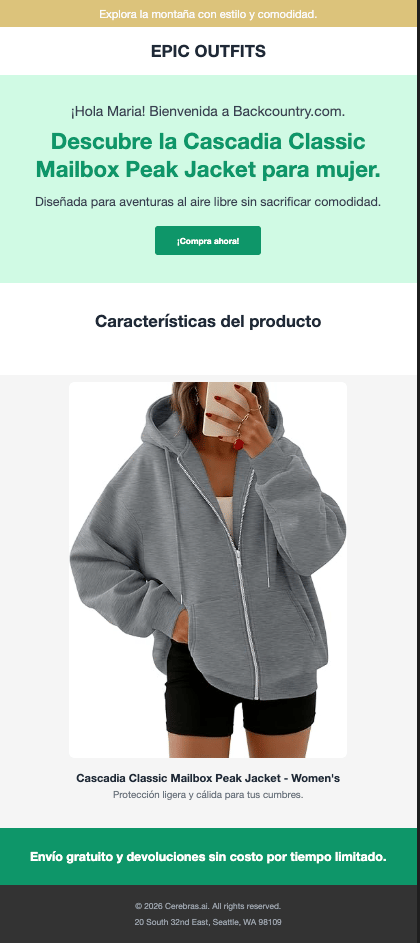
# Output: "¡Hola Maria!" - friendly greeting in Spanish
# German, formal, introverted user
content3, time3, usage3 = generate_and_display(users[2])
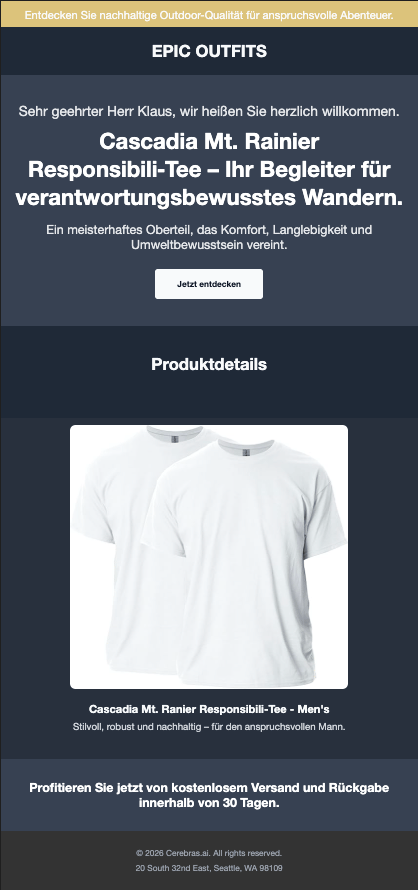
# Output: "Sehr geehrter Herr Klaus," - formal greeting in German
Example Results
Here are three personalized pages generated for different users:
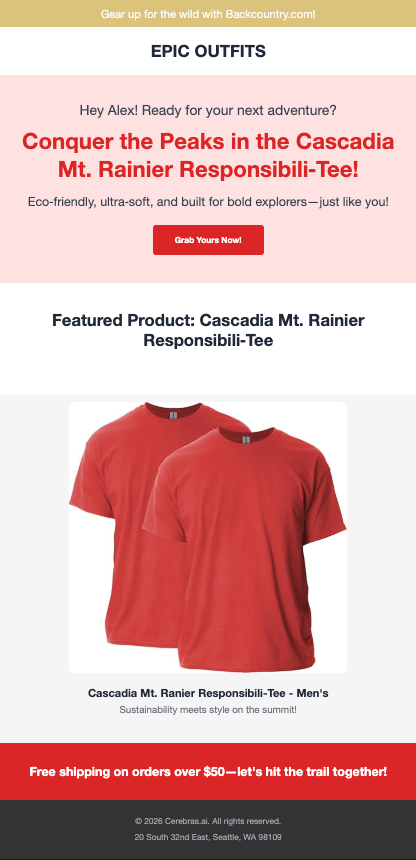
Alex’s page: Casual tone, English, red accent color, extroverted personality
Maria’s page: Friendly tone, Spanish, green accent color, balanced personality
Klaus’s page: Formal tone, German, white accent color, introverted personality
Why This Matters
Research shows that hyper-personalization significantly increases user engagement. According to Zarouali et al. (2020), personalized content that adapts to individual preferences including tone, and messaging leads to higher perceived relevance and stronger behavioral intentions compared to generic content.
With Cerebras’ ultra-fast inference, this level of personalization becomes practical for real-time web experiences. What used to require batch processing or slow generation can now happen at page-load speed, creating truly dynamic user experiences.
| Metric | Value |
|---|
| Average generation time | ~0.4s per page |
| Tokens per page | ~800-900 |
| Languages supported | English, Spanish, German (extensible) |
| Personalization dimensions | 6 (language, tone, personality, color, gender, background) |
Cerebras enables real-time personalization at scale—generate thousands of unique pages per minute.
print("\n" + "="*60)
print("⚡ CEREBRAS PERFORMANCE SUMMARY")
print("="*60)
times, tokens = [], 0
for i, user in enumerate(users):
content, elapsed, usage = generate_page_content(user)
times.append(elapsed)
tokens += usage['total_tokens']
lang = LANGUAGE_MAP.get(user.preferred_language, "en")[:2]
print(f"User {i+1}: {lang} | {user.tone} | {user.personality} → {elapsed:.2f}s")
print(f"\n📊 Average: {sum(times)/len(times):.2f}s per page")
print(f"📊 Total: {sum(times):.2f}s for {len(users)} pages")
print(f"📊 Tokens: {tokens} total ({tokens//len(users)} avg)")
print(f"\n🚀 Real-time personalization at scale!")
Summary
What We Built
A hyper-personalized web page system where pages adapt to each visitor:
- Preferred colors - Visual styling matches user preferences
- Tone & personality - Content adapts from formal to casual
- Products - Featured items match user demographics
- Language - Full multilingual support
All powered by Cerebras’ ultra-fast inference (~0.4s per page), making real-time personalization practical at scale.
Key Patterns
- Schema-constrained generation: Use
response_format with JSON schema for reliable outputs
- Pydantic validation: Validate all LLM responses before use
- Template separation: LLM generates text, templates handle layout/styling
- Concise prompts: Shorter prompts reduce latency and cost
Next Steps
- Add A/B testing for different content variations
- Implement click tracking and conversion analytics
- Add more personalization dimensions (purchase history, browsing behavior)
- Deploy as a real-time API for e-commerce personalization
Resources
Acknowledgements
Thank you to the Cerebras team, particularly, Ryan, Ryann, and Neeraj, for their support and feedback during the development of this cookbook.