

Model Overview
- Architecture: Built on the GLM-4.x foundation using a Mixture-of-Experts (MoE) Transformer architecture.
- Efficiency: 358.0B total parameters, with ~32B active per forward pass via MoE routing.
- Open source: Released under an MIT-style permissive license, enabling fine-tuning, self-hosting, and flexible deployment, subject to the terms in the official repository.
- Data privacy: When you run GLM 4.7 on Cerebras Inference, your inputs and outputs are processed in memory and never persisted.
GLM 4.7 is a foundation model from Zhipu AI (Z.ai) built for coding and agentic workflows. It offers strong code generation, reasoning, and tool-use capabilities, along with new thinking controls (interleaved, preserved, and turn-level) that improve stability in multi-turn tasks.
Cerebras Model ID
zai-glm-4.7
Context
131k
(131,072 tokens)
Max output
40k
max_completion_tokens
Benchmark Performance
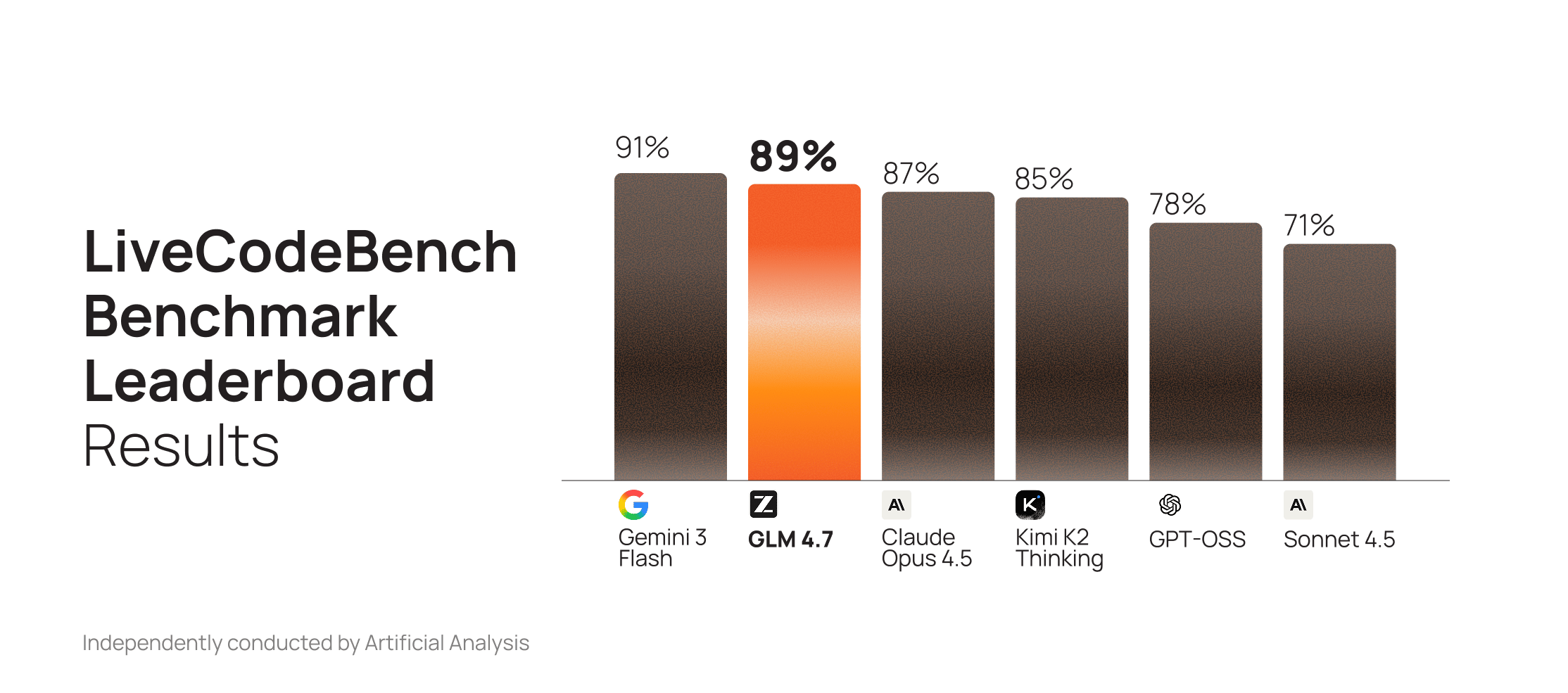
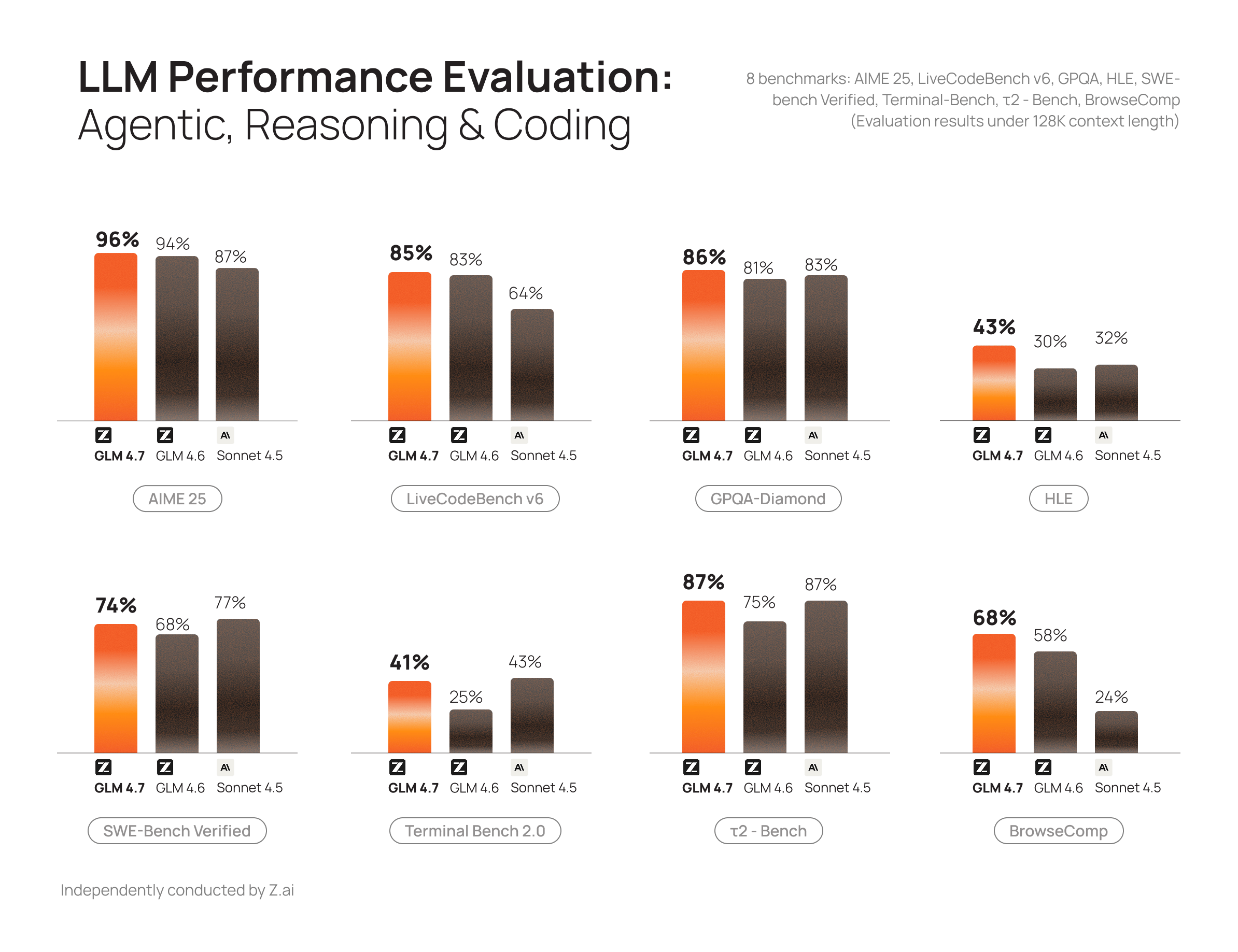
GLM 4.6 was already a top-performing open model for code generation. GLM 4.7 extends that lead with substantial gains on GPQA and AIME, outperforming Claude Sonnet 4.5 on both.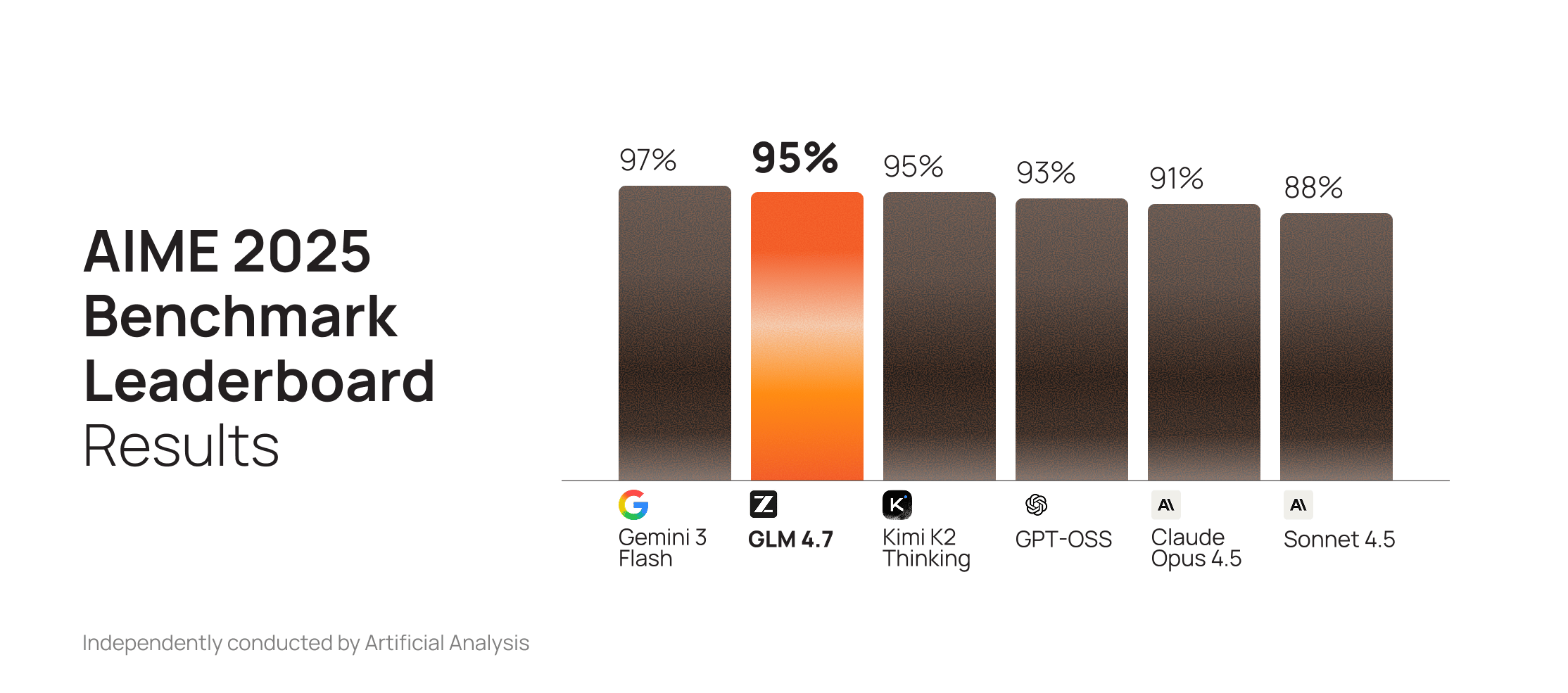
Migration Checklist
Model and parameters- Set
modeltozai-glm-4.7 - Keep defaults unless you have a reason:
temperature=1,top_p=0.95 - For deterministic outputs, adjust either
temperatureortop_p, not both
- Reasoning is enabled by default
- To disable:
reasoning_effort="none"(disable_reasoningis deprecated as of March 24, 2026) - To preserve traces (recommended for agentic/coding workflows):
clear_thinking: false
max_completion_tokens: up to 40k- Context window: ~131k tokens
- Test against real workloads for randomness, latency, tool-call parsing, and long-context behavior
API Examples
- Model
- Sampling
- Reasoning
- OpenAI
- Streaming
To test the new model, update
model to zai-glm-4.7.Migration Best Practices
When migrating to GLM 4.7, a common mistake is reusing old prompts without adjusting them for the model’s preferred prompting style and reasoning/streaming behavior. To fully leverage this model’s strengths, refine prompts, tool-calling flows, and sampling parameters accordingly.1. Front-load instructions
1. Front-load instructions
GLM 4.7 places heightened attention on the beginning of the prompt. To ensure consistent instruction following, place all required rules, constraints, and behavioral instructions at the beginning of the system prompt.GLM 4.7 supports long context (up to ~131k on Cerebras), but instruction-following quality typically peaks at much shorter lengths and can degrade near the maximum.This is especially important when using prompting patterns that rely on “think” tags.
2. Use clear and direct instructions
2. Use clear and direct instructions
GLM 4.7 responds more reliably to explicit rules than to suggestive or optional language.
- Use unambiguous terms such as MUST, REQUIRED, or STRICTLY.
- Avoid soft phrasing such as “Please try to…” or indirect suggestions.
- Do: “Before writing any code, you MUST first read and fully comprehend the
architecture.mdfile. All code you generate must strictly conform…” - Don’t: “Please read and follow my
architecture.md…”
3. Specify a default language
3. Specify a default language
Because GLM 4.7 is multilingual, it may occasionally switch languages if not instructed otherwise. Explicit language control prevents this behavior.Add a directive like “Always respond in English” (or your preferred language) in your system prompt to prevent unexpected responses or reasoning traces in other languages.
4. Use role prompts intentionally
4. Use role prompts intentionally
GLM 4.7 follows roles and personas closely. Assigning clear roles improves consistency and accuracy.Example:
"You are a senior software architect. Review the following specifications and produce a structured design proposal."Role-based prompting also works well in multi-agent systems, with each agent having its own persona.5. Use critic agents for validation
5. Use critic agents for validation
When building agentic systems, rather than relying on a single agent to both generate and validate code, create dedicated critics to review and validate outputs before allowing the main agentic flow to advance in its plan.These could include:
- Code reviewer: A sub-agent configured to rigorously check for code quality, adherence to SOLID/DRY/YAGNI principles, and maintainability issues.
- QA tester: Potentially bound with agentic browser capabilities to test user flows, edge cases, and integration points.
- Security reviewer: Specialized in identifying vulnerabilities, unsafe patterns, and compliance issues.
- Performance analyst: Focused on detecting performance bottlenecks, inefficient algorithms, or resource leaks.
6. Break down tasks
6. Break down tasks
Even with improved stability and thinking controls, you will generally get better reliability by breaking complex work into small, well-defined substeps.For example:
- List dependencies
- Propose new structure
- Generate code
- Verify output
7. Minimize reasoning when not needed
7. Minimize reasoning when not needed
GLM 4.7 may generate verbose reasoning blocks that are unnecessary and slow down responses.Treat reasoning as a resource: disable it for simple tasks to reduce latency, and preserve it only when it improves quality or your workflow depends on it.We recommend the following:
- Disable reasoning with
reasoning_effort="none". See our Reasoning guide for more information.This is different from thethinkingparameter that Z.ai uses in their API. - Preserve reasoning traces with
clear_thinking: falsefor agentic/coding workflows and prompt caching use cases. - Set appropriate
max_completion_tokenslimits. For focused responses, consider using lower values. - Use prompt-based control by adding instructions to minimize reasoning in your system prompt. For example: “Reason only when necessary” or “Skip reasoning for straightforward tasks.”
- Use structured output formats (JSON, lists, bullets) that naturally discourage verbose reasoning blocks.
8. Enable enhanced reasoning for complex tasks
8. Enable enhanced reasoning for complex tasks
For tasks requiring deeper analysis:
- Ensure
reasoning_effortis not set to"none". - Add reasoning directives such as:
- “Think step by step.”
- “Break the problem down logically.”
- Include examples that demonstrate the reasoning process you want, showing the model how to work through problems methodically.
9. Combine GLM 4.7 with frontier models when needed
9. Combine GLM 4.7 with frontier models when needed
If your workload includes tasks requiring frontier-level reasoning accuracy, consider hybrid architectures:
- Route simpler tasks to GLM 4.7 and use a frontier model for more complex queries.
- Use GLM 4.7 as a fast agent that loops in frontier models only when needed.
- Use a frontier model to create a plan, then execute it rapidly with GLM 4.7.
10. Tune sampling parameters
10. Tune sampling parameters
Parameter tuning has a significant impact on output quality. The recommended defaults from Z.ai and Cerebras are:
On Cerebras, adjust these parameters via the API:
Q&A
- Reasoning & thinking
- Model & use cases
- Limits & parameters
- Tools, streaming, caching
- Benchmarks (3rd party)
How do I configure the reasoning?
How do I configure the reasoning?
Use
reasoning_effort="none" to disable reasoning on GLM 4.7. (disable_reasoning is deprecated as of March 24, 2026.)We also support ZAI’s “preserved thinking” behavior via clear_thinking, which controls whether reasoning content is cleared or retained across turns in multi-turn workflows (including tool-calling loops).[Default]Exclude thinking from earlier turns:clear_thinking: true[Recommended for coding/agentic + better cache hit rates]Preserve thinking from previous turns:clear_thinking: false
What is clear_thinking?
What is clear_thinking?
Starting with GLM 4.5, Z.ai introduced support for Interleaved Thinking, allowing the model to think between tool calls and after receiving tool results. GLM 4.7 further enhances Interleaved Thinking and introduces Preserved Thinking and Turn-level Thinking.
- Preserved Thinking (
clear_thinking: false): retain reasoning across turns for multi-step coding/agentic workflows - Note: Setting
clear_thinking: falsecan improve cache hit rate in agent loops
What is Preserved Thinking?
What is Preserved Thinking?
Preserved Thinking is the ability to maintain a model’s reasoning context across multiple API calls, particularly during multi-step tool-calling workflows. Without it, when you send tool results back to the model, it may need to re-derive its approach from scratch, which can introduce inconsistencies.Enable preserved thinking with
zai-glm-4.7 by setting clear_thinking: false (it’s true by default).This is becoming a common pattern for production agents across providers, though each implements it differently (for example: encrypted “thought tokens”, server-side state, or stateless encrypted blobs).Credits
These guides are written with the wonderful contributions of our community Discord users—namely Autoshot (Jan Feddersen), Sewer56, and many others.Next Steps
- Explore available models - Pricing, rate limits, and capabilities
- Get an API key - Test GLM 4.7 in our API playground
- Join the Cerebras Discord - Share feedback, observations, and best practices with other developers